
Onten Hubs & Docks – Ultimate Connectivity for Modern Devices
In today’s fast-paced digital world, laptops, tablets, ultrabooks, and even smartphones are designed to be thinner, lighter, and more portable than ever before. While this sleek design improves mobility, it comes at a cost: fewer ports. Many modern devices now feature only one or two USB-C or Thunderbolt connections, leaving users struggling to connect multiple peripherals simultaneously. From external monitors and keyboards to flash drives, printers, SD cards, and wired internet connections, having limited ports can slow down your work, interrupt creativity, and add frustration to daily tasks. That’s where Onten Hubs & Docking Stations step in—offering a seamless, high-performance solution that brings your devices to life. Onten is a globally recognized brand known for producing durable, innovative, and affordable connectivity solutions. Every hub and docking station is engineered to help you expand your laptop or tablet into a full workstation, allowing multiple devices to connect through a single port. This means you can enjoy high-speed data transfers, connect external monitors for multitasking, charge your laptop or tablet via Power Delivery, and maintain a clutter-free, organized workspace—all at the same time.
For professionals in Bangladesh, Onten Hubs & Docks are perfect for boosting productivity. Whether you are working remotely, managing a multi-screen office setup, attending online classes, or running a small business, these hubs allow you to do more without interruptions. They eliminate the need for constantly swapping cables, reduce wear on your device’s ports, and give you a clean, professional setup that keeps your workflow smooth and efficient. What sets Onten apart is its focus on performance, reliability, and user-friendly design. Advanced chipsets ensure stable and fast connections for USB devices, high-resolution displays, and wired internet, while built-in safety features protect your devices from overcurrent, overheating, and short circuits. Sleek aluminum and premium plastic designs also ensure durability and heat management, while keeping your hub portable enough to carry anywhere—from office desks to home workstations or on-the-go setups. Whether you’re a student attending online classes, a freelancer working with multiple devices, a professional handling office productivity, or a designer working with high-resolution media, Onten Hubs & Docks transform your limited-port device into a powerful, multi-functional workstation. With Onten, you get the perfect balance of connectivity, performance, and convenience, making every connection count.
A Complete Shopping Guide for Onten Hubs & Docks
Choosing the right hub or docking station can make a big difference in how smoothly your digital setup works. With so many options available, it’s important to understand what features matter most based on how you use your device. This guide will help you pick the perfect Onten hub or dock for your laptop, MacBook, tablet, or PC.
1. Know Your Device’s Port Type
The first step in choosing the right hub or dock is understanding what ports your device has:
-
USB‑C – Most modern laptops (including MacBooks, Chromebooks, Windows ultrabooks)
-
Thunderbolt 3/4 – High‑speed data and video support (backward compatible with USB‑C)
-
USB‑A – Older laptops and desktops
Make sure the hub or dock matches your laptop’s port type. For USB‑C devices, choose a USB‑C hub or docking station; for Thunderbolt devices, choose one that supports Thunderbolt for the best performance.
2. Decide Which Ports You Actually Need
Different users require different combinations of ports. Before buying, think about what you use daily:
| Port Type | What It’s Used For |
|---|---|
| USB‑A | Keyboards, mouse, flash drives |
| USB‑C | Fast data, charging pass‑through |
| HDMI / DisplayPort / VGA | External monitors or projectors |
| Ethernet (LAN) | Stable wired internet |
| SD/microSD Card Reader | Photos & media transfers |
| Audio Jack | Headphones, speakers |
If you work with external displays, choose a hub with HDMI or DisplayPort. If you need wired internet (especially in offices or schools), prioritize an Ethernet port.
3. Display Requirements — Single vs Dual Monitors
External display support is one of the most important features for many users. Be sure to check:
-
Single Monitor Support – Perfect for everyday use
-
Dual Monitor Support – Ideal for multitasking and productivity
-
4K Resolution Support – Best for creative work and high‑quality display needs
Always match the hub’s output resolution (e.g., 4K @ 30Hz or 60Hz) with your monitor’s capabilities for the best experience.
4. Power Delivery (PD) — Charging Through the Hub
Many Onten hubs support USB‑C Power Delivery (PD)—meaning you can charge your laptop or tablet while using the hub:
| Power Level | Best For |
|---|---|
| Up to 30W‑60W | Smartphones, tablets, lightweight laptops |
| 60W‑100W+ | Larger laptops, MacBook Pros, heavy usage |
A hub with PD keeps your workspace clean and removes the need for multiple chargers.
5. Data Speed & Performance
Faster data transfer means less waiting for file transfers:
-
USB 3.0 / Gen 1 – Up to 5 Gbps
-
USB 3.1 / Gen 2 – Up to 10 Gbps
-
Thunderbolt – Up to 40 Gbps
If you frequently move large files (photos, videos, backups), choose a hub with higher speeds.
6. Portability vs. Power
Think about how you’ll use your hub:
-
Portable hubs – Lightweight and ideal for students or travelers
-
Powerful docking stations – Best for office setups with multiple devices
Portable hubs are great for daily carry, while advanced docks are ideal for fixed workstations.
7. Build Quality & Durability
Good build quality makes a difference:
-
Metal bodies – Better heat dissipation and long-lasting
-
Premium ABS plastic – Lightweight with strong performance
-
Short or braided cables – Less tangling and better durability
Onten is known for sturdy design, ensuring you get reliable performance every day.
8. Compatibility with Your System
Make sure the hub works with your device’s operating system:
✔ Windows
✔ macOS
✔ Chrome OS
✔ Linux
Some features like dual display or Ethernet may behave differently across systems—check compatibility before purchase.
9. Budget & Value
Set your budget based on real needs—don’t pay extra for features you won’t use.
-
Basic USB hubs – Affordable, essential expansion
-
Mid‑range USB‑C hubs – Best mix of ports + PD
-
Advanced docking stations – Best for professional workstations
Quick Checklist Before You Buy an Onten Hub or Dock
✔ Match your device’s port type
✔ Count the ports you need
✔ Confirm display support and resolutions
✔ Look for Power Delivery (PD)
✔ Check data speed (Gbps)
✔ Consider portability and build quality
✔ Verify compatibility with your OS
✔ Choose based on your budget
Connect Everything in One Click with Onten Hubs & Docks from A To Z Computer
Looking for Onten Hubs & Docking Stations in Bangladesh? Discover a wide range of USB hubs, USB-C adapters, and professional docking stations designed for modern laptops and desktops. Enjoy better connectivity, faster data access, and a cleaner workspace with Onten’s reliable and affordable solutions. You may find original Onten products like HDD, HDD-SSD Enclosure, Bluetooth Adapter, and more at A To Z Computer. Upgrade your setup today and experience smart connectivity without limits with Onten Hubs & Docks from us.
-250x250.png "Onten OTN-UC601 Type-C 12-in-1 Docking Station")
-250x250.png "Onten OTN-UCA5311 USB 3.1 Gen1 5G Hub with Ethernet Card")
- Type: Converter
- Length.: 0.5 Meter
- Resolution: Not Applicable
- Color: Black
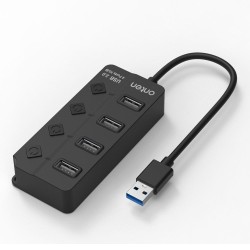
- Type: USB HUB
- Length: 0.8 Meter
- Interface: USB-A 2.0
- Color: Black

- Interface: USB 2.0 (4 Ports, Type-A)
- Function: Data Transfer + Smart Fast Charging
- Cable Length: 0.2m
- Data Rate: 480 Mbps
-250x250.png "Onten OTN-UCA310 USB-C/USB Male to Quad USB Female Black Hub")
- Item Category: Converter
- Type: USB HUB
- Length: 0.5 Meter
- Interface(s): USB-A & USB-C Male to Quad USB Female
-250x250.png "Onten OTN-5222 4-in-1 USB 3.0 Hub")
- Input: 1 × USB 3.0 Type-A
- Output: 4 × USB 3.0 Type-A
- Transfer Speed: Up to 5Gbps
- Cable Length: 0.2m
-250x250.png "Onten OTN-5701D USB Male to Quad USB Female Crystal Teal Hub")
- Type: USB Hub
- Length: 0.1 Meter
- Color: Crystal Teal
- Transmission Speed: 480Mbps
-250x250.png "Onten OTN-9701D USB-C Male to Quad USB Female Crystal Teal Hub")
- Type: USB Hub
- Length: Unmentioned
- Number of USB Ports: 4
- Transmission Speed: 480Mbps
-250x250.png "Onten OTN-9199A 13 in 1 Multi Function Docking Station")
- Input: 1 × USB-C male, 1 × USB-C PD
- Material: Aluminum alloy + ABS plastic
- Works with Windows, Mac OS, Linux, Android, iOS
- Dual Display Support
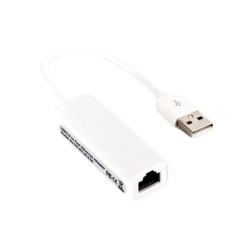
- Fast USB 3.0 data transfer
- Stable RJ45 wired internet
- Multiple USB ports
- Plug-and-play, no drivers needed
-250x250.png "Onten OTN-5308 10 Port USB Hub With Power Switch")
- Input: 1 × USB 3.0 Type-A
- Output: 10 × USB 3.0 Type-A
- External Power Supply Port: DC 12V
- Individual Power Switches with LED Indicators
-250x250.png "ONTEN OTN-5317S 7 Ports USB 3.0 HUB")
- Interface - Up to 5 Gbps
- Port - 7 × USB 3.0 Ports
- Type - USB 3.0 Hub
- Power - DC 5V / 3A
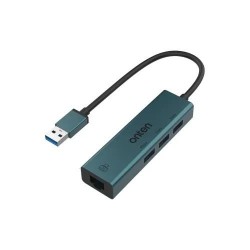
- SuperSpeed 5 Gbps USB transfer
- Built-in Gigabit Ethernet port
- Plug-and-play installation
- Compact, portable design
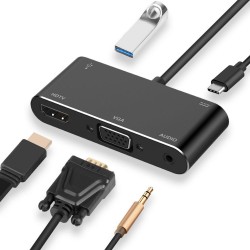
- Dual display outputs support
- USB-C PD pass-through charging
- High-speed USB 3.0 port
- Audio + VGA connectivity supported
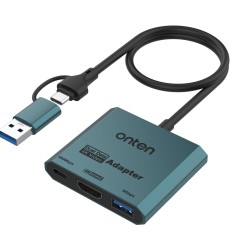
- Supports 4K@60Hz HDMI output
- Dual USB-C & USB-A input
- Plug-and-play, no drivers
- Wide OS compatibility
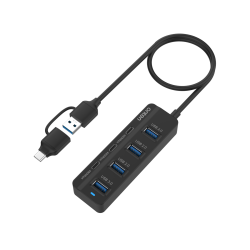
- High‑speed USB‑A 3.0 port
- Mixed USB‑A & USB‑C connectors
- USB‑C power input support
- Plug‑and‑play compatibility
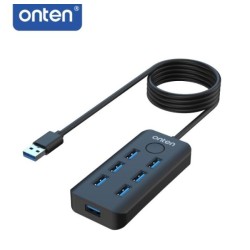
- Seven high‑speed USB ports (7 USB‑A)
- Up to 5Gbps transfer speeds
- One‑click lock screen button
- Plug‑and‑play USB connectivity

- 11‑in‑1 port expansion
- HDMI + VGA video outputs
- Gigabit Ethernet connectivity
- USB‑C PD charging support
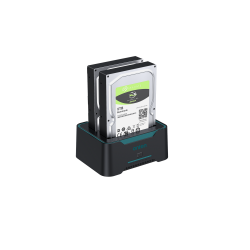
- Dual‑bay SATA HDD/SSD support (2.5″ & 3.5″)
- Up to 2×16TB drive capacity
- High‑speed USB 3.0 transfer
- Plug‑and‑play, tool‑free use
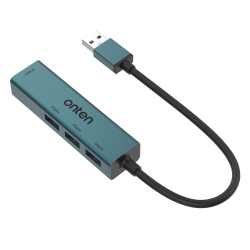
- Four USB 3.0 ports
- Up to 5 Gbps transfer
- Aluminum alloy build
- Plug‑and‑play use
What is the Onten Hubs & Docks price in Bangladesh 2026?
A To Z Computer Onten Hubs & Docks Price List page shows you prices for the latest Onten Hubs & Docks models available in Bangladesh with Avail benefits such as free shipping, EMI, extended warranty, and assured buyback. Find the lowest prices in Bangladesh along with product specifications, key features, pictures, ratings & more. The lowest prices are obtained for easy price comparison. Follow us on Facebook For Regular updates & offers. Subscribe to Our YouTube Channel for Product Reviews.
Latest Onten Hubs & Docks price List in BD 2026
View today 2026-07-26 last updated prices of Onten Hubs & Docks in Bangladesh. Last updated date 07/24/2026